Showing posts with label svg cutting file. Show all posts

Saturday, December 23, 2017

Bash My Stash: Christmas Tag Gift Card Holder Freebie

**This post contains affiliate links and I will be compensated if you make a purchase after clicking on my links.


I'm finishing up my holiday preparations and quickly put together a couple of the Christmas Tag Gift Card Holders by Printable Cuttable Creatables.


I imported the file into Cricut Design Space and resized it to make a large tag.  I have a couple of certificates that aren't standard gift card size.  The finished tag is approximately 6" tall by 3" wide.  I added the rectangle so I would have a piece to stamp on since the Recollections patterned paper is very busy.


Since I am still working on bashing my stash, I used an old stamp from SU All Year Cheer II and some stickers that I have had since the early 2000's. I also used up some old embossing powder that I've had for at least 15 years, not my favourite as far a quality goes but the colour was right for this project.   The ribbon is SU Whisper White.

These will hang from the tree until my kids get here to open gifts on Christmas Day.

I might even make a couple more in a standard gift card size if I have time - they are perfect for gift card giving year round.

This SVG file is currently available for free on the Printable Cuttable Creatables website.


Saturday, June 17, 2017

Design Space 3: Upload Images with Drag and Drop

**This post contains affiliate links and I will be compensated if you make a purchase after clicking on my links.

I think the ability to upload images to the new Cricut Design Space 3 by drag and drop is probably the thing I like the most about the updates so far.

I have so many SVG files on my computer but haven't uploaded them to Design Space until now because of how long it used to take in DS2.

I mainly use my iPad for cutting since my main computer is not in my craft room.   I usually just use my desktop for uploading, although I do like how the new DS3 seems a lot like the iPad app.  


I have a folder full of free SVG files that I downloaded from Birds Cards a couple of years ago when I first upgraded to the Cricut Explore from the Expression2.  
  
The new drag and drop feature makes it really easy to upload files to Design Space 3.  
Click on the Upload Image button - it lists the types of files that you can add.


The Drag and Drop screen will open, select your file and drag it into that box.


Your image will show up on this screen -  I added in tags to make it easier to search.  
Then hit save...

And then your image shows up in the Recently Uploaded Images section.

Nice and fast.  As I do this I am also dragging and dropping into Silhouette Studio Designer Edition, which I run off of an external hard drive with my Mac Mini to save space.  I've saved my zipped files in my OneDrive account and am deleting the copies off of my hard drive as I upload to the software. 

Sunday, February 26, 2017

All Dreaming Tree SVG Freebies Available With One Click Download

For a limited time, download all 39 of Dreaming Tree SVG freebies with one click! 

Facebook share is required on the download page.


Friday, December 23, 2016

Popcorn Gift Card Holder by Lori Whitlock

Here's another cute gift card holder using a file from the Silhouette store and designed by Lori Whitlock - perfect for movie passes.  I used Recollections cardstock and sponged the popcorn kernels with my CTMH Canary Exclusive Inks™ Stamp Pad.


These will go into my kid's Christmas Stockings, I like doing gift cards but they can be a bit boring so I wanted to dress them up and this file was perfect.

Tuesday, December 20, 2016

Christmas Kisses Gift Card Holder by Lori Whitlock

**This post contains affiliate links and I will be compensated if you make a purchase after clicking on my links.


Here's the first project I've made with my Silhouette Portrait using the Christmas Kisses Gift Card Holder by Lori Whitlock.


It fits a standard size gift card and five Kisses perfectly.


The sentiment is a print and cut and I had some Recollections cardstock with a holly print that I thought would be a great match. 


I folded all the tabs in then folded the card top-down and bottom-up and used double sided tape on the tabs. 


I adhered the gift card holder and sentiment pieces first.


Then folded the bottom box in towards the line created by the edge of the gift card holder. 


There is a solid piece at the back for writing on and a decorative strip to fill in the space below. 


The SVG file is available in Lori Whitlock's Store or in the Silhouette Design Store as a .studio file.


Monday, August 29, 2016

New Autumn Decor SVG Bundle from Dreaming Tree

Have you seen the latest from Dreaming Tree?

This Autumn Decor Svg Bundle is free with $9.98 purchase.


What a fun set - I love the lantern.  Don't forget to check the Freebies section - lots of great files to download for your cutting machine.

Friday, May 8, 2015

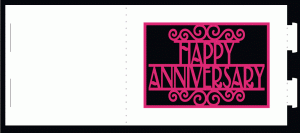
Bendy Fold Anniversary Card

My Grandparents are celebrating their 65th Wedding Anniversary this month and I wanted to make them a special card.

I ended up going with a free file from Birds Cards that I had downloaded earlier this month.


I went online to see what the traditional colours are for 65th Anniversary - 
Sky Blue according to About.com


In Cricut Design Space I resized the card so that the back part of the card measured 5x5.


Then I made 2 labels - one for the back of the card that was personalized and another for the inside with an Anna Griffin Anniversary sentiment that I found in Design Space.

I used the writing feature with my Cricut Explore with the Pilot Precise V5 pens - I was so impressed with these pens in the Explore.  I took a short video clip with my iPhone as it was writing.  
The fine detail is amazing!  


Inner label with Sentiment from Anna's Garden Cards & Embellishments written with Cricut Explore.


I cut the base of my card using CTMH White Daisy Cardstock 
and covered the front opening with light blue vellum.


I cut the outer frame piece out of CTMH Silver Glitter paper and carefully attached it so nothing stuck to the vellum.  I wanted the vellum to bend with the front of the card and hide the inner sentiment label.   


I used my CTMH Artfully Sent Cricut Cartridge to cut a 5x7 Envelope out of CTMH Glacier Cardstock in keeping with the 65th Sky Blue Anniversary theme. 


Birds Cards cutting files are available free for personal use only.

Close To My Heart products are available for purchase on my CTMH website

Cricut Explore Air & Anna Griffin Cartridge are available at Cricut.com


Sunday, April 26, 2015

Colouring Book SVG 201 with Crafts By Two

Today I cut the svg cutting file that I made following the How Two: Coloring Book SVG 201 Tutorial by Crafts By Two.  I used the same image as the 101 Tutorial.   

In the 101 tutorial you cut every layer. I had a lot of small pieces with the eyes, brows, nostrils & mouth all cutting separately and needing to be layered.  The 201 tutorial goes over additional steps to eliminate some of those extra cuts.   I was able to have the smaller pieces cut out of the face and have the black layer underneath show through.


There are the pieces all cut out. Notice the layer with the face.


Here I have it mostly glued together. So much easier than trying to place every piece on the face in proportion to each other.  


This shows the face from the second over top of the first - I wanted to see how close I was in guessing where all the pieces went in the 101 piece.  Not too bad I was off just a little bit. 


Here are both cuts side by side, the 101 piece is on the left and the 201 piece is on the right.  I didn't have a coloured image in front of me when I used Inkscape for the 201 so I didn't notice that I had changed the hair to the side of the face in the second cut.  The finished product isn't much different but was way easier to cut and assemble by eliminating all those extra pieces.  I will definitely be using this tutorial again to make more cutting files for my personal scrapbook pages. 

Find the Tutorials on the Craft By Two Site.

See my original post here

If using a licensed image to make a cutting file remember personal use only.
This image will be used in my Walt Disney World scrapbook. 

Thursday, April 23, 2015

Colouring Book SVG 101 with Crafts By Two

About a month ago I bookmarked the Crafts By Two Colouring Book Series and printed off the reference sheets that go along with the videos.   Yesterday I decided I would follow along with the first tutorial - I didn't watch any of the videos, just used the written instructions.

I've used Inkscape in the past for converting images to svg for using with My Memories Digital Scrapbook Software.   And that was only to import as solid image after using trace bitmap.

I found the written tutorial very easy to follow.  I had watched a video that someone else had done and it didn't work.  The Crafts By Two didn't leave out any steps and I was able to save my svg and cut it out with my Cricut Explore last night.


I found this image online.  I was looking for an image with larger pieces and everything connected for filling in with colour.  I do have a few Disney cartridges that I bought in the United States so I had a good idea of what I wanted when piecing together of all the cuts.  

I imported the picture into Inkscape and followed the instructions by 
Crafts By Two - How To: Coloring Book SVG 101


Here is my svg uploaded into Cricut Design Space.


Each piece cut out with my Cricut Explore.  Even the teeny, tiny pieces for the nostrils cut out. 


Here's my finished image all glued together.  
The only piece that didn't work well for me was the highlight on the nose.  
I ended up removing it and using a black pen instead.  
I like how it turned out even with having to put the face together like that.  

I watched all the videos this morning and using the same image I am going to follow 
Crafts By Two: How To Coloring Book Svg 201.  

I will post that as soon as I have it cut and pieced together and will show a side by side comparison with this first image. 

To see the video tutorials and download the pdf instructions visit:


If using a licensed image to make a cutting file remember personal use only.
This image will be used in my Walt Disney World scrapbook. 


Saturday, April 4, 2015

Free Svg files for cutting machines at Daily Art Hub

I just joined Daily Art Hub - they give away free svg files each day. Files are available for download for 24 hours.

Here's what I got today:


Very cute - lots of good images on the site for scrapbooking. 

Tuesday, March 31, 2015

MyScrapChick.com Baby Belly Boxes

Aren't these so cute! I made them for Greta's Craft Fair which was hosted by Baby & Tot Show in Abbotsford, BC last weekend.

They are part of a trio of svg cutting files from myscrapchick.com - check out the site, they are having a Dollar Sale this week until April 2nd.   With Cricut Design Space it was so easy to upload and resize these images for cutting.

I used CTMH Champagne, CTMH White Daisy & CTMH Whisper cardstock. I sponged lightly around the edges of the Champagne Cardstock with CTMH Champagne Ink.  The soothers and pin heads were cut from scrap paper I had in my stash.


All online orders placed through my Close To My Heart website will have 15% of the sale donated to help Greta